Calculator program structure...
main.xml file
<?xml version="1.0" encoding="utf-8"?>
<LinearLayout xmlns:android="http://schemas.android.com/apk/res/android"
android:layout_width="match_parent"
android:layout_height="match_parent"
android:gravity="left|right"
android:orientation="vertical" >
<EditText
android:id="@+id/screen"
android:layout_width="match_parent"
android:layout_height="0dp"
android:layout_weight="1"
android:cursorVisible="false"
android:editable="false"
android:gravity="right"
android:textSize="40dp"
android:text="0" >
</EditText>
<LinearLayout
android:id="@+id/linearLayout1"
android:layout_width="match_parent"
android:layout_height="0dp"
android:layout_weight="1" >
<Button
android:id="@+id/buttonSqr"
android:layout_width="0dp"
android:layout_height="match_parent"
android:layout_weight="1"
android:onClick="ButtonClickHandler"
android:text="√"
android:textColor="#228B22"
android:textSize="30dp" />
<Button
android:id="@+id/buttonOnediv"
android:layout_width="0dp"
android:layout_height="match_parent"
android:layout_weight="1"
android:onClick="ButtonClickHandler"
android:text="1/x"
android:textColor="#228B22"
android:textSize="30dp" />
<Button
android:id="@+id/buttonMod"
android:layout_width="0dp"
android:layout_height="match_parent"
android:layout_weight="1"
android:onClick="ButtonClickHandler"
android:text="%"
android:textColor="#228B22"
android:textSize="30dp" />
<Button
android:id="@+id/buttonPow"
android:layout_width="0dp"
android:layout_height="match_parent"
android:layout_weight="1"
android:onClick="ButtonClickHandler"
android:text="^"
android:textColor="#228B22"
android:textSize="30dp" />
</LinearLayout>
<LinearLayout
android:id="@+id/linearLayout2"
android:layout_width="match_parent"
android:layout_height="0dp"
android:layout_weight="1" >
<Button
android:id="@+id/button1"
android:layout_width="0dp"
android:layout_height="match_parent"
android:layout_weight="1"
android:onClick="ButtonClickHandler"
android:text="1"
android:textColor="#000000"
android:textSize="30dp" />
<Button
android:id="@+id/button2"
android:layout_width="0dp"
android:layout_height="match_parent"
android:layout_weight="1"
android:onClick="ButtonClickHandler"
android:text="2"
android:textColor="#000000"
android:textSize="30dp" />
<Button
android:id="@+id/button3"
android:layout_width="0dp"
android:layout_height="match_parent"
android:layout_weight="1"
android:onClick="ButtonClickHandler"
android:text="3"
android:textColor="#000000"
android:textSize="30dp" />
<Button
android:id="@+id/buttonAdd"
android:layout_width="0dp"
android:layout_height="match_parent"
android:layout_weight="1"
android:onClick="ButtonClickHandler"
android:text="+"
android:textColor="#228B22"
android:textSize="30dp" />
</LinearLayout>
<LinearLayout
android:id="@+id/linearLayout3"
android:layout_width="match_parent"
android:layout_height="0dp"
android:layout_weight="1" >
<Button
android:id="@+id/button4"
android:layout_width="0dp"
android:layout_height="match_parent"
android:layout_weight="1"
android:onClick="ButtonClickHandler"
android:text="4"
android:textColor="#000000"
android:textSize="30dp" />
<Button
android:id="@+id/button5"
android:layout_width="0dp"
android:layout_height="match_parent"
android:layout_weight="1"
android:onClick="ButtonClickHandler"
android:text="5"
android:textColor="#000000"
android:textSize="30dp" />
<Button
android:id="@+id/button6"
android:layout_width="0dp"
android:layout_height="match_parent"
android:layout_weight="1"
android:onClick="ButtonClickHandler"
android:text="6"
android:textColor="#000000"
android:textSize="30dp" />
<Button
android:id="@+id/buttonSub"
android:layout_width="0dp"
android:layout_height="match_parent"
android:layout_weight="1"
android:onClick="ButtonClickHandler"
android:text="-"
android:textColor="#228B22"
android:textSize="30dp" />
</LinearLayout>
<LinearLayout
android:id="@+id/linearLayout4"
android:layout_width="match_parent"
android:layout_height="0dp"
android:layout_weight="1" >
<Button
android:id="@+id/button7"
android:layout_width="0dp"
android:layout_height="match_parent"
android:layout_weight="1"
android:onClick="ButtonClickHandler"
android:text="7"
android:textColor="#000000"
android:textSize="30dp" />
<Button
android:id="@+id/button8"
android:layout_width="0dp"
android:layout_height="match_parent"
android:layout_weight="1"
android:onClick="ButtonClickHandler"
android:text="8"
android:textColor="#000000"
android:textSize="30dp" />
<Button
android:id="@+id/button9"
android:layout_width="0dp"
android:layout_height="match_parent"
android:layout_weight="1"
android:onClick="ButtonClickHandler"
android:text="9"
android:textColor="#000000"
android:textSize="30dp" />
<Button
android:id="@+id/buttonMulti"
android:layout_width="0dp"
android:layout_height="match_parent"
android:layout_weight="1"
android:onClick="ButtonClickHandler"
android:text="x"
android:textColor="#228B22"
android:textSize="30dp" />
</LinearLayout>
<LinearLayout
android:id="@+id/linearLayout5"
android:layout_width="match_parent"
android:layout_height="0dp"
android:layout_weight="1" >
<Button
android:id="@+id/buttonPoint"
android:layout_width="0dp"
android:layout_height="match_parent"
android:layout_weight="1"
android:onClick="ButtonClickHandler"
android:text="."
android:textColor="#228B22"
android:textSize="30dp" />
<Button
android:id="@+id/button0"
android:layout_width="0dp"
android:layout_height="match_parent"
android:layout_weight="1"
android:onClick="ButtonClickHandler"
android:text="0"
android:textColor="#000000"
android:textSize="30dp" />
<Button
android:id="@+id/buttonDel"
android:layout_width="0dp"
android:layout_height="match_parent"
android:layout_weight="1"
android:onClick="ButtonClickHandler"
android:text="del"
android:textColor="#FF4500"
android:textSize="30dp" />
<Button
android:id="@+id/buttonDiv"
android:layout_width="0dp"
android:layout_height="match_parent"
android:layout_weight="1"
android:onClick="ButtonClickHandler"
android:text="/"
android:textColor="#228B22"
android:textSize="30dp" />
</LinearLayout>
<LinearLayout
android:id="@+id/linearLayout6"
android:layout_width="match_parent"
android:layout_height="0dp"
android:layout_weight="1" >
<Button
android:id="@+id/buttonClear"
android:layout_width="0dp"
android:layout_height="match_parent"
android:layout_weight="1"
android:onClick="ButtonClickHandler"
android:text="C"
android:textColor="#FF4500"
android:textSize="30dp" />
<Button
android:id="@+id/buttonExe"
android:layout_width="0dp"
android:layout_height="match_parent"
android:layout_weight="1"
android:onClick="ButtonClickHandler"
android:text="="
android:textColor="#228B22"
android:textSize="40dp" />
</LinearLayout>
</LinearLayout>
CalculatorActivity.java
package android.calculator;
import android.app.Activity;
import android.os.Bundle;
import android.view.View;
import android.widget.*;
public class CalculatorActivity extends Activity {
/** Called when the activity is first created. */
boolean clear_screen = true;
boolean operator_state = false ;
boolean insert_state = false;
boolean last_click = false;
float Operand1 = 0f;
float Operand2 = 0f;
float Answer = 0f;
String Operator = "";
@Override
public void onCreate(Bundle savedInstanceState) {
super.onCreate(savedInstanceState);
setContentView(R.layout.main);
}
public void insert_text(String text){
EditText screen = (EditText) findViewById(R.id.screen);
if (this.clear_screen){
screen.setText("");
this.clear_screen = false;
}
this.insert_state = true;
this.last_click = true;
screen.append(text);
}
public void set_operator(String operator){
EditText screen = (EditText) findViewById(R.id.screen);
if (screen.getText().toString().equals(".")) screen.setText("0");
if (this.insert_state && this.operator_state && this.last_click){
calculator();
}
if (screen.getText().toString().length() > 0 ){
this.Operand1 = Float.parseFloat(screen.getText().toString());
}
this.operator_state = true;
this.clear_screen = true;
this.last_click = false;
if (operator.equals("+")) this.Operator = "+";
else if (operator.equals("-")) this.Operator = "-";
else if (operator.equals("*")) this.Operator = "*";
else if (operator.equals("/")) this.Operator = "/";
else if (operator.equals("√")){
this.Answer = (float) Math.sqrt(Float.parseFloat(screen.getText().toString()));
screen.setText(this.Answer + "");
this.clear_screen = true;
this.Operand1 = 0f;
this.Operand2 = 0f;
this.Operator = "";
this.last_click = true;
this.operator_state = false ;
}else if (operator.equals("d")){
this.Answer = 1 / Float.parseFloat(screen.getText().toString());
screen.setText(this.Answer + "");
this.clear_screen = true;
this.Operand1 = 0f;
this.Operand2 = 0f;
this.Operator = "";
this.last_click = true;
this.operator_state = false ;
}
else if (operator.equals("^")) this.Operator = "^";
else if (operator.equals("%")) this.Operator = "%";
}
public void calculator(){
EditText screen = (EditText) findViewById(R.id.screen);
if (screen.getText().toString().equals(".")){
screen.setText("0");
}
if (screen.getText().toString().length() > 0){
this.Operand2 = Float.parseFloat(screen.getText().toString());
}
if (this.Operator.equals("+")) {
this.Answer = this.Operand1 + this.Operand2;
} else if (this.Operator.equals("-")){
this.Answer = this.Operand1 - this.Operand2;
} else if (this.Operator.equals("*")){
this.Answer =this.Operand1 * this.Operand2;
} else if (this.Operator.equals("/")){
this.Answer = this.Operand1 / this.Operand2;
}else if (this.Operator.equals("^")){
this.Answer = (float) Math.pow(this.Operand1, this.Operand2);
}else if (this.Operator.equals("%")){
this.Answer = Operand1 % this.Operand2;
}else{
this.Answer = Float.parseFloat(screen.getText().toString());
}
screen.setText(this.Answer + "");
}
public void ButtonClickHandler(View v){
EditText screen = (EditText) findViewById(R.id.screen);
switch(v.getId()){
case R.id.button0 : insert_text("0"); break;
case R.id.button1 : insert_text("1"); break;
case R.id.button2 : insert_text("2"); break;
case R.id.button3 : insert_text("3"); break;
case R.id.button4 : insert_text("4"); break;
case R.id.button5 : insert_text("5"); break;
case R.id.button6 : insert_text("6"); break;
case R.id.button7 : insert_text("7"); break;
case R.id.button8 : insert_text("8"); break;
case R.id.button9 : insert_text("9"); break;
case R.id.buttonPoint :
if (!screen.getText().toString().contains(".") || this.operator_state){
insert_text(".");
}
break;
case R.id.buttonAdd : set_operator("+"); break;
case R.id.buttonSub : set_operator("-"); break;
case R.id.buttonMulti: set_operator("*"); break;
case R.id.buttonDiv: set_operator("/"); break;
case R.id.buttonSqr: set_operator("√"); break;
case R.id.buttonPow: set_operator("^"); break;
case R.id.buttonMod: set_operator("%"); break;
case R.id.buttonOnediv: set_operator("d"); break;
case R.id.buttonExe:
if(screen.getText().toString().length() > 0 && this.Operator != ""){
calculator();
this.clear_screen = true;
this.Operand1 = 0f;
this.Operand2 = 0f;
this.Operator = "";
this.operator_state = false ;
}
break;
case R.id.buttonDel:
if(screen.getText().toString().length() > 1){
String screen_new = screen.getText().toString().substring(0, screen.getText().toString().length()-1);
screen.setText(screen_new);
this.clear_screen = false;
}else{
screen.setText("0");
this.clear_screen = true;
}
break;
case R.id.buttonClear:
this.Operand1 = 0f;
this.Operand2 = 0f;
this.Answer = 0f;
this.Operator = "";
this.operator_state = false ;
this.insert_state = false;
this.last_click = false;
this.clear_screen = true;
screen.setText("0");
break;
}
}
}
Output
Download Source Code
Download apk file
It's
simple to set background image for your android application.
Below I have an example code for this as well.
- Create a new android application in Eclipse. (Here I have used 4.2 Jelly Bean version).
- Copy your image file to /res/drawable-mdpi directory.
- Open your layout xml file activity_main.xml and add below line;
BackgroundImage program structure...
activity_main.xml file
android:background="@drawable/android"
Here 'android' is the name of the image without extension
<RelativeLayout xmlns:android="http://schemas.android.com/apk/res/android"
xmlns:tools="http://schemas.android.com/tools"
android:layout_width="match_parent"
android:layout_height="match_parent"
android:paddingBottom="@dimen/activity_vertical_margin"
android:paddingLeft="@dimen/activity_horizontal_margin"
android:paddingRight="@dimen/activity_horizontal_margin"
android:paddingTop="@dimen/activity_vertical_margin"
android:background="@drawable/android"
tools:context=".MainActivity" >
<TextView
android:layout_width="wrap_content"
android:layout_height="wrap_content"
android:text="@string/hello_world" />
</RelativeLayout>
Run your application. The image will be applied as background for this layout.
1). JSF Calendar Example Structure:
Note: Download below js and css files
2). index.jsp
<%@ page language="java" import="java.util.*" pageEncoding="ISO-8859-1"%>
<%@ taglib uri="http://java.sun.com/jsf/html" prefix="h" %>
<%@ taglib uri="http://java.sun.com/jsf/core" prefix="f" %>
<!DOCTYPE HTML PUBLIC "-//W3C//DTD HTML 4.01 Transitional//EN">
<html>
<head>
<link href="css/CalendarControl.css" rel="stylesheet" type="text/css">
<script src="js/CalendarControl.js" language="javascript"></script>
</head>
<body>
<f:view>
<h:form>
<h:messages style="color: red;"></h:messages>
<table>
& <h:outputText value="Enter following Information"></h:outputText>
<tr>
<td>
<h:outputText value="Date:-"></h:outputText>
<h:inputText id="name" value="#{Bean.name}" required="true" onclick="showCalendarControl(this);">
<f:validateLength minimum="2" maximum="25"></f:validateLength>
nbsp; </h:inputText>
</td>
</tr>
<tr>
<td>
<h:commandButton id="button" action="result" value="Submit"></h:commandButton>
</td>
</tr>
</table>
</h:form>
</f:view>
</body>
</html>
3). display.jsp
<%@ page language="java" import="java.util.*" pageEncoding="ISO-8859-1"%>
<%@ taglib uri="http://java.sun.com/jsf/html" prefix="h" %>
<%@ taglib uri="http://java.sun.com/jsf/core" prefix="f" %>
<!DOCTYPE HTML PUBLIC "-//W3C//DTD HTML 4.01 Transitional//EN">
<html>
<head>
<title>Calendar</title>
</head>
<body>
<f:view>
<table>
<tr>
<td><b>
<h:outputText value=" Selected date is:- #{Bean.name}"></h:outputText></b>
</td>
</tr>
<tr>
<td>
<a href="/JSF_Calendar/faces/index.jsp">Back</a>
</td>
</tr>
</table>
</f:view>
</body>
</html>
4). faces-config.xml
<?xml version="1.0" encoding="UTF-8"?>
<faces-config
xmlns="http://java.sun.com/xml/ns/javaee"
xmlns:xsi="http://www.w3.org/2001/XMLSchema-instance"
xsi:schemaLocation="http://java.sun.com/xml/ns/javaee http://java.sun.com/xml/ns/javaee/web-facesconfig_1_2.xsd"
version="1.2">
<navigation-rule>
<from-view-id>/index.jsp</from-view-id>
<navigation-case>
<from-outcome>result</from-outcome>
<to-view-id>/display.jsp</to-view-id>
</navigation-case>
</navigation-rule>
<managed-bean>
<managed-bean-name>Bean</managed-bean-name>
<managed-bean-class>com.satyamsoft.in.Bean</managed-bean-class>
<managed-bean-scope>request</managed-bean-scope>
</managed-bean>
</faces-config>
5). Bean.java
package com.satyamsoft.in;
public class Bean {
private String name;
public String getName() {
return name;
}
public void setName(String name) {
this.name = name;
}
}
6). OutPut
1). JSF outputFormat tag Example Structure:
2). index.jsp
<%@ page language="java" import="java.util.*" pageEncoding="ISO-8859-1"%>
<%@ taglib prefix="f" uri="http://java.sun.com/jsf/core"%>
<%@ taglib prefix="h" uri="http://java.sun.com/jsf/html"%>
<html>
<head>
<title>JSF outputFormat example</title>
</head>
<body>
<f:view>
<h:form>
<h3><h:outputText value="h:outputFormat example" ></h:outputText></h3>
<hr>
<h3>Text</h3>
<b><h:outputFormat value="Country 1 : {0}, Country 2 : {1}, Country 3 : {2}" >
<f:param value="INDIA" />
<f:param value="USA" />
<f:param value="ENGLAND" />
</h:outputFormat></b>
</h:form>
</f:view>
</body>
</html>
3). OutPut
1). JSF selectOneMenu tag Program Structure:
2). index.jsp
<%@ page language="java" import="java.util.*" pageEncoding="ISO-8859-1"%>
<%@ taglib prefix="f" uri="http://java.sun.com/jsf/core"%>
<%@ taglib prefix="h" uri="http://java.sun.com/jsf/html"%>
<html>
<head>
<title>JSF selectOneMenu example</title>
</head>
<body>
<f:view>
<h:form>
<h3><h:outputText value="h:selectOneMenu example" ></h:outputText></h3>
<hr>
<h3>Combo Box</h3>
<h:selectOneMenu value="#{selectOneMenu.selectedCountry}">
<f:selectItem itemValue="INDIA" itemLabel="india" />
<f:selectItem itemValue="USA" itemLabel="usa" />
<f:selectItem itemValue="ENGLAND" itemLabel="england" />
<f:selectItem itemValue="AUSTRALIA" itemLabel="australia" />
<f:selectItem itemValue="CANADA" itemLabel="canada" />
</h:selectOneMenu>
<h:commandButton value="Submit" action="result" />
</h:form>
</f:view>
</body>
</html>
3). SelectOneMenu.java
package com.satyamsoft;
import java.io.Serializable;
import javax.faces.bean.ManagedBean;
import javax.faces.bean.SessionScoped;
@ManagedBean(name="selectOneMenu", eager=true)
@SessionScoped
public class SelectOneMenu implements Serializable{
private static final long serialVersionUID = 1L;
public String selectedCountry="1";
public String getSelectedCountry() {
return selectedCountry;
}
public void setSelectedCountry(String selectedCountry) {
this.selectedCountry = selectedCountry;
}
}
4). result.jsp
<%@ page language="java" import="java.util.*" pageEncoding="ISO-8859-1"%>
<%@ taglib prefix="f" uri="http://java.sun.com/jsf/core"%>
<%@ taglib prefix="h" uri="http://java.sun.com/jsf/html"%>
<html>
<body>
<f:view>
<h:form>
<h:panelGrid columns="1">
<h:column>
<h:dataTable value="#{selectOneMenu.selectedCountry}" var="loc" border="1">
<h:column>
<f:facet name="header">
<h:outputText value="Selected Country is:" />
</f:facet>
<b><h:outputText value="#{loc}"/></b>
</h:column>
</h:dataTable>
</h:column>
</h:panelGrid>
</h:form>
</f:view>
</body>
</html>
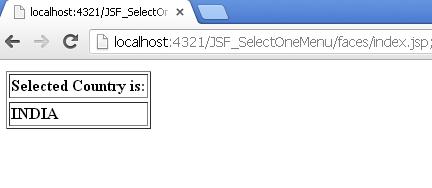
5). OutPut
1). JSF selectManyListbox tag Program Structure:
2). index.jsp
<%@ page language="java" import="java.util.*" pageEncoding="ISO-8859-1"%>
<%@ taglib prefix="f" uri="http://java.sun.com/jsf/core"%>
<%@ taglib prefix="h" uri="http://java.sun.com/jsf/html"%>
<html>
<head>
<title>JSF selectManyListbox example</title>
</head>
<body>
<f:view>
<h:form>
<h3><h:outputText value="h:selectManyListbox example" ></h:outputText></h3>
<hr>
<h3>List Box</h3>
<h:selectManyListbox value="#{selectManyListbox.selectedCountry}">
<f:selectItem itemValue="INDIA" itemLabel="india" />
<f:selectItem itemValue="USA" itemLabel="usa" />
<f:selectItem itemValue="ENGLAND" itemLabel="england" />
<f:selectItem itemValue="AUSTRALIA" itemLabel="australia" />
<f:selectItem itemValue="CANADA" itemLabel="canada" />
</h:selectManyListbox>
<h:commandButton value="Submit" action="result" />
</h:form>
</f:view>
</body>
</html>
3). SelectManyListbox.java
package com.satyamsoft;
import java.io.Serializable;
import javax.faces.bean.ManagedBean;
import javax.faces.bean.SessionScoped;
@ManagedBean(name="selectManyListbox", eager=true)
@SessionScoped
public class SelectManyListbox implements Serializable{
private static final long serialVersionUID = 1L;
public String[] selectedCountry={"1","2","3"};
public String[] getSelectedCountry() {
return selectedCountry;
}
public void setSelectedCountry(String[] selectedCountry) {
this.selectedCountry = selectedCountry;
}
}
4). result.jsp
<%@ page language="java" import="java.util.*" pageEncoding="ISO-8859-1"%>
<%@ taglib prefix="f" uri="http://java.sun.com/jsf/core"%>
<%@ taglib prefix="h" uri="http://java.sun.com/jsf/html"%>
<html>
<body>
<f:view>
<h:form>
<h:panelGrid columns="1">
<h:column>
<h:dataTable value="#{selectManyListbox.selectedCountry}" var="loc" border="1">
<h:column>
<f:facet name="header">
<h:outputText value="Selected Country is:" />
</f:facet>
<b><h:outputText value="#{loc}"/></b>
</h:column>
</h:dataTable>
</h:column>
</h:panelGrid>
</h:form>
</f:view>
</body>
</html>
5). OutPut
1). JSF selectOneListbox tag Program Structure:
2). index.jsp
<%@ page language="java" import="java.util.*" pageEncoding="ISO-8859-1"%>
<%@ taglib prefix="f" uri="http://java.sun.com/jsf/core"%>
<%@ taglib prefix="h" uri="http://java.sun.com/jsf/html"%>
<html>
<head>
<title>JSF selectOneListbox</title>
</head>
<body>
<f:view>
<h:form>
<h3><h:outputText value="h:selectOneListbox example" ></h:outputText></h3>
<hr>
<h3>List Box</h3>
<h:selectOneListbox value="#{selectOneListbox.selectedCountry}">
<f:selectItem itemValue="INDIA" itemLabel="india" />
<f:selectItem itemValue="USA" itemLabel="usa" />
<f:selectItem itemValue="ENGLAND" itemLabel="england" />
<f:selectItem itemValue="AUSTRALIA" itemLabel="australia" />
<f:selectItem itemValue="CANADA" itemLabel="canada" />
</h:selectOneListbox>
<h:commandButton value="Submit" action="result" />
</h:form>
</f:view>
</body>
</html>
3). SelectOneListbox.java
package com.satyamsoft;
import java.io.Serializable;
import javax.faces.bean.ManagedBean;
import javax.faces.bean.SessionScoped;
@ManagedBean(name="selectOneListbox", eager=true)
@SessionScoped
public class SelectOneListbox implements Serializable{
private static final long serialVersionUID = 1L;
public String selectedCountry="1";
public String getSelectedCountry() {
return selectedCountry;
}
public void setSelectedCountry(String selectedCountry) {
this.selectedCountry = selectedCountry;
}
}
4). result.jsp
<%@ page language="java" import="java.util.*" pageEncoding="ISO-8859-1"%>
<%@ taglib prefix="f" uri="http://java.sun.com/jsf/core"%>
<%@ taglib prefix="h" uri="http://java.sun.com/jsf/html"%>
<html>
<body>
<f:view>
<h:form>
<h:panelGrid columns="1">
<h:column>
<h:dataTable value="#{selectOneListbox.selectedCountry}" var="loc" border="1">
<h:column>
<f:facet name="header">
<h:outputText value="Selected Country is:" />
</f:facet>
<b><h:outputText value="#{loc}"/></b>
</h:column>
</h:dataTable>
</h:column>
</h:panelGrid>
</h:form>
</f:view>
</body>
</html>
5). OutPut